
Getting Started
This guide will help you get started with the research process and organize your results in order to manage the many steps involved in doing research.
You may also be interested in the following guides:
Need More Help?
Research can be a complex, lengthy, and sometimes intimidating process, but the APU Libraries can help. Librarians are always available to give you customized research suggestions, and you can find books and articles (print and online) via the APU Libraries website.
Subject-Specific Research Assistance
Did you know that there's a librarian who specializes in helping students from your major? Contact your subject librarian for customized help.
Step 1: Understand the Assignment
Identifying the amount and types of sources your assignment requires will help you choose the right online research tools.
Before you begin developing a strategy for searching the library catalog and databases, you should clarify several things about the assignment:
- What type of assignment is it?
(Research paper, essay, opinion paper, review, or other?) - How long does your paper need to be?
- How many sources do you need for your bibliography?
- What types of information do you need?
(Statistics, Web pages, books, articles, images, audio/video clips, or other?) - Do you need current or historical sources? Or both?
If you are unclear on any of the requirements, ASK YOUR PROFESSOR ASAP! Doing this early in the semester will save you stress later on and will show your professor that you are proactive.
Step 2: Choose a Topic
Sometimes your topic is assigned by your professor. However, most of the time your professor will give you the freedom to choose your own research topic. Choosing a topic that is specific enough to be manageable without being too narrow can be difficult, but these steps can help.
First, think about what topics might be of interest to you. You can get ideas by skimming your textbook, reading news magazines like Time, or keeping an eye on the news.
Once you've identified a broad topic, looking at a few scholarly reference books (such as dictionaries and encyclopedias) can help you figure out which authors and sources are the most important to know about. Scholarly encyclopedias can also help you discover narrower aspects of your broad topic so that your topic is more manageable.
Often a scholarly reference book will give you a short, authoritative overview of your topic and suggest additional sources for you to read. In essence, reading a reference article can save you time and give you a head-start on your project!
There are two easy ways to find reference material. First, try doing a keyword search of the APU Library Catalog for your topic, limiting your search to the Reference collection (use the drop-down "View Entire Collection" menu and choose "Reference"). Second, try searching for your topic in an online reference database, such as Credo Reference, Gale Virtual Reference Library, Oxford Reference Online, or SAGE eReference.
Step 3: Develop a Research Question
After you've identified and narrowed a research topic, you should re-state it in the form of a research question. Phrasing your topic in the form of a question helps to direct your research process.
Asking whether a fact or statistic directly answers your research question can help you find the most relevant information for your topic. A good research question also leads to a direct answer in the form of a thesis.
A sample research question might be:
What are some strategies for improving employee retention among female law enforcement officers?
This question might lead to the following thesis in the final paper:
"Recommended strategies for improving employee retention among female law enforcement officers include: flexible benefits and scheduling, diversity training, and..."
Step 4: Identify Keywords
A good research question also helps you pull out the different concepts your research will cover. Concepts are discrete ideas that can be researched independently from each other, although most of the time you are looking for research on how multiple concepts interact with each other. Our example, "What are some strategies for improving employee retention among female law enforcement officers?" has 3 distinct concepts:
- Employee retention
- Female
- Law enforcement officers
These concepts will become the search keywords you will use in the Library Catalog and online article databases. Keywords are words that appear in the title, table of contents, and other parts of the book or article record in the catalog or database. Keyword searching is different from subject searching, since a keyword search will only return results that exactly match the terms you enter. Searching by subject headings will allow you to pull up books and articles on that topic, regardless of whether or not a particular keyword appears in the record. For more information on subject searching, see our LibGuide on Finding Library Resources by Subject.
Keep in mind that not every author will use the same keywords to describe a topic: one author might write about "police officers," and another might use the phrase "law enforcement officers."
For this reason, you will want to identify some synonyms and related terms for each of your keywords before you start searching. For example:
- Employee retention
- Synonyms/related terms: recruitment, promotion, advancement, loyalty
- Female
- Synonyms/related terms: women, mothers
- Law enforcement officers
- Synonyms/related terms: police, sheriff, cops
Step 5: Develop a Search String
Once you've identified your search terms and synonyms, the final pre-search step is to combine those terms into search strings.
To give you the most precise results, online search tools like the library catalog and databases require a specific format for search statements, including the use of words called Boolean operators. Boolean operators are the words AND, OR, and NOT. Placing these words between your search terms will help you find books and articles that are targeted to your research topic.
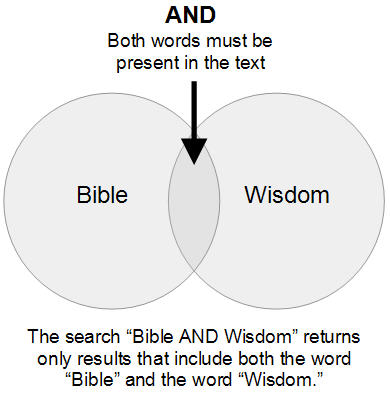
The Boolean operator AND gives you more targeted results by requiring that two or more terms all appear within the title, abstract, or table of contents of a book or article. Let's imagine we are looking for information on workplace discrimination.
A keyword search in the library catalog for "discrimination" returns 423 titles.
A keyword search for "discrimination AND workplace" returns only 12 titles, but those 12 are much more relevant to our topic.
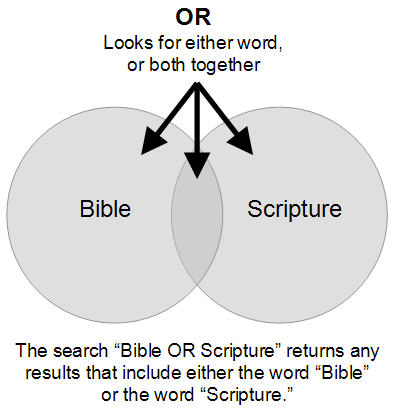
The Boolean operator OR is the opposite of AND. OR generally gives you more search results by requiring either one term or another to appear in a book or article. OR works best when you are looking for synonyms or related terms.
For example, a keyword search in the library catalog for "recruitment" returns 62 titles.
A keyword search for "recruitment OR retention" returns 141 titles.
A keyword search for "recruitment AND retention" returns 17 titles.
Step 6: Choose the Right Database
There are 2 types of research sources that can be found through the APU Libraries web site: books and articles.
To find books, use the APU Library Catalog:
To find articles, use a database. This short video from RMIT (an Australian university) can help you understand what library databases contain and how they work: http://www.youtube.com/watch?v=KKIbnNLCh8g&feature=player_embedded
APU subscribes to more than 120 subscription databases, so it can be tricky to find the right one! The easiest way to choose the right database for your topic is to use the subject menu on the "All Databases" page--it will help you find a database recommended for your subject.
Still not sure? A good multidisciplinary database to begin with is Academic Search Premier:
(Search results will open in a new window.)
Step 7: Mark, Save, and Email Your Results
Once you've started finding books and articles on your topic, be sure to save the information. This will save you time as you organize your notes and start preparing your bibliography.
In the APU Library Catalog, you can download information about the books you find by adding them to your book bag:

Then, click the "View Bag" button and follow the directions to print, save, or email your records:

You can also automatically generate an APA, MLA, or Chicago-style citation for the books you find by clicking on the "WorldCat Citations" link from the catalog record:
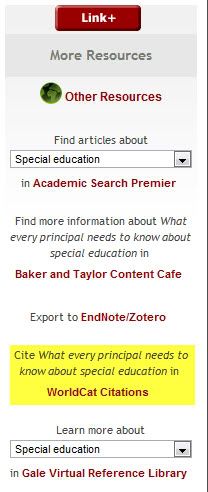
In online databases, look for buttons or checkbozes to mark your articles or save them in a folder. Then look for print/email/save options; usually you can also choose to have a pre-formatted citation (in APA, MLA, or Chicago style) included in the email or saved file.
If the database you're using does not have a full-text copy of the article you need, click on the "Full Text Finder" button. The Full Text Finder will tell you if there is a copy of the article in another database; if so, it will link you to the full text.
If the Full Text Finder indicates that full text is not available, it will provide you with a link to the ArticleReach service. Click the link to request a free, scanned copy of the article from another library. For more information about ArticleReach, please see our ArticleReach guide.
Step 8: Write Your Paper
By this point, you should have a pretty good idea of what your main points are. If you want some help with the writing process, you should schedule an appointment with the APU Writing Center. The writing tutors can give you tips, feedback, and suggestions that can help you write a great paper!
Step 9: Cite Your Sources
It is important that you cite your information sources correctly in your paper, for several reasons:
- You need to give credit to the original author of your information.
- If you don't cite your sources, you may be accused of plagiarism.
- Providing citations shows your professor that you have devoted time and effort to researching your topic.
- Citations help future readers of your work locate the sources you've used, so that they can build upon the research you've started.
If you need help citing sources, there are several how-to guides available in the LibGuides system.